Green Pinterest Templates for Canva: Streamline Your Pin Strategy
Why Your Pinterest Workflow Needs a System, Not Just More Time
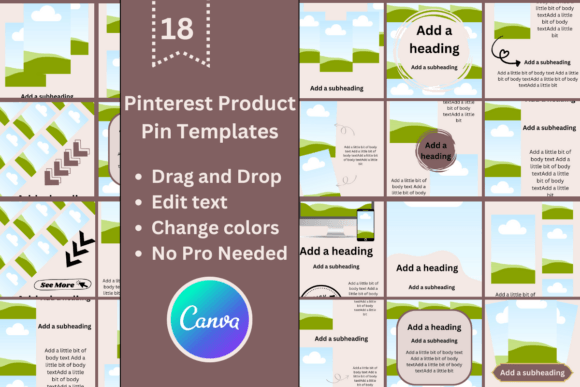
We’ve all been there. You’ve written a stellar blog post or launched a fantastic new product, and now it’s time for the Pinterest grind. You open a blank canvas, stare at the blinking cursor, and realize you need to create not just one, but several unique, eye-catching pins for this single piece of content. The pressure to make each one fresh, on-brand, and optimized for the platform can turn a 10-minute task into an hour-long creative block. This is where having a robust system changes the game. The Pinterest Templates for Canva | Green collection is built for exactly this purpose—it’s a strategic asset designed to eliminate guesswork and accelerate your content production without sacrificing quality or visual appeal.
A Visual Identity Built on Calm and Clarity
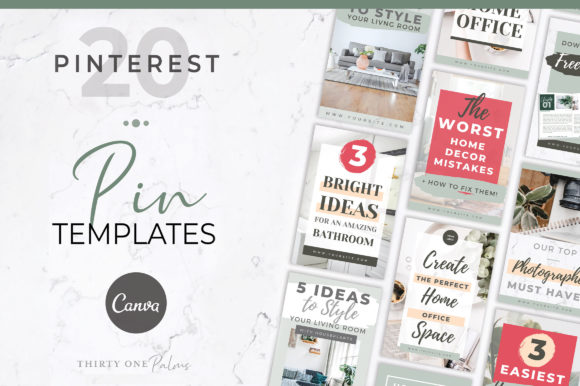
Let’s talk about what makes this particular set of design assets stand out. The “Green” in the title isn’t just a color; it’s a mood and a strategy. The palette is anchored in versatile, natural greens—from soft sage to deep emerald—paired with clean neutrals. This isn’t a loud, aggressive color scheme; it’s confident and approachable. The overall style leans into modern typography with a focus on readability. You’ll find a mix of sans serif font choices for body copy that remains legible even on small mobile screens, complemented by tasteful display font or script font accents for headlines that need a touch of personality. The layouts themselves are clean, with intentional use of negative space, subtle highlights, and structured text blocks. This creates a visual hierarchy that guides the viewer’s eye exactly where you want it—to your key message, your call to action, or your featured image. The result is a collection of pins that feel professional, polished, and inherently trustworthy, which is crucial for building a recognizable brand identity on a visual platform like Pinterest.
Practical Applications Beyond the Blog Post
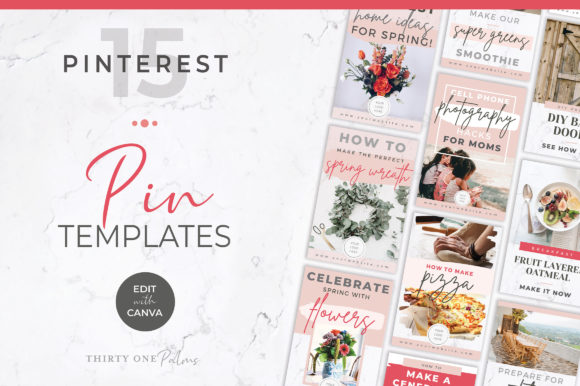
While these templates are perfect for bloggers driving traffic to their latest article, their utility extends far beyond that. For an eCommerce brand, imagine using them to create a series of pins for a single product. One pin could be a clean product shot with a text overlay highlighting a key benefit. Another could use a lifestyle image with a font pairing that tells a story about how the product fits into your customer’s life. A third could be a simple, text-focused pin stating a customer testimonial. Each pin looks distinct, yet they all belong to the same cohesive campaign, thanks to the consistent use of the green palette and typographic style. This approach is gold for the Pinterest algorithm, which favors “fresh” pins—new images pointing to the same URL.
Freelancers and service-based professionals can leverage these creative font combinations and layouts for social media graphics that establish expertise. A social media manager could create a series of tip-based pins, a web designer could showcase portfolio pieces, or a copywriter could share bite-sized writing advice. The templates provide the professional framework; you inject your specific knowledge and imagery. This is about using a premium font and layout system to project the right kind of authority in your niche. The green tones work exceptionally well for brands in wellness, sustainability, finance, education, or any field where growth, balance, and reliability are core messages.
Integrating Templates into Your Design Process
Adopting a template system like this is less about losing creativity and more about focusing it. Instead of starting from zero each time, you begin with a proven, well-designed structure. Your creative energy shifts from “how should I lay this out?” to “what compelling message or image will I plug into this layout?” This is where you evaluate font pairing and readability. The included templates give you a curated starting point, but the real power comes from customization. You have the freedom to change every color to match your brand identity, swap the sans serif font for one from your own style guide, or replace the display font accent with a handwritten font if that suits your brand’s voice better.
When choosing which template to use, consider the content’s goal. A pin designed to showcase a recipe might use the template with a large image placeholder and minimal text. A pin for a lead magnet might use one with a strong headline, a bullet-point list, and a clear button for the call to action. The variety within the 20 templates ensures you have options for different content types. It’s also wise to think about commercial font use. Since the templates are provided via a Canva link, you are using fonts available within Canva’s library, which are licensed for commercial use on the platform. This removes a significant hurdle for small business owners and creators who may not have subscriptions to other font services.
From Template to Tailored Content: A Quick Guide
Getting started is straightforward. You click the provided link, which opens a copy of the templates directly in your Canva account. From there, the process is interactive. You can change the background colors, adjust the text to your headline and body copy, and upload your own photos or use the provided image library. The instruction sheet is a helpful touch for those less familiar with Canva’s interface, covering the basics of editing elements and exporting your final pins. The goal is to make the technical side as simple as possible so you can focus on the strategic side: creating multiple pins that test different angles, images, and headlines for the same piece of content.
This practice of creating several pins per URL is a fundamental Pinterest marketing tactic. It allows you to see which visual style and message resonate most with your audience. With these Pinterest Templates for Canva | Green, you’re not just making one pin; you’re building a mini-campaign in a fraction of the time. The consistent visual hierarchy built into the templates ensures that even as you create variations, your overall look remains professional and recognizable. This consistency is a cornerstone of effective editorial design and digital marketing—it builds trust and makes your content instantly identifiable as it scrolls by in a user’s feed.
Ultimately, the value of a resource like this lies in its ability to remove friction from your creative workflow. It’s a practical toolkit for anyone who needs to maintain an active, engaging presence on Pinterest without it becoming a full-time job. By providing a structured yet flexible starting point, it empowers you to produce a higher volume of quality content, test your strategies more effectively, and present a polished, cohesive face to your audience. It’s not about replacing your creativity; it’s about channeling it more efficiently toward the content that drives results.